Fourth grade is working on understanding how to mix value with paint. They've learned about hue, tint, tone, and shade and have chosen a project to demonstrate their learning with. Luckily, our fourth graders have Chromebooks, so we use Google Classroom and I put all of the resources linked in this post on their GC for them to teach themselves how to create the projects while I circulated and talked with them to gauge understanding and assist where needed. They had three projects prepared for them, and a slide of other ideas in case they didn't like any of the prepared projects or wanted to challenge themselves more.
I began with this presentation about value, hue, tint, tone, and shade and how to mix each value. Then students logged into their Chromebook to begin the project of their choice. The first project we talked about is based on artist, James Rizzi and his cityscapes. They had access to this presentation of examples of Rizzi's cityscapes and this video of me creating my example project, which is hanging on the whiteboard in the art studio. They were told that each building should be monochromatic and use the hue, tints, tones, and shades of the color chosen for the building.
The next project, shown above with the image that inspired me and my example from the video, is value chevrons. They have access to this video to show them how to create the chevrons and mix values to paint them.
The final project that was prepared for them is the value pyramids shown above. The first image is what inspired me and the second is the example I created in this video for the students.
I have started this project with two of my four fourth grade classes because we didn't have specials on Friday for me to see the other two. So far I am happy with the students' progress overall and am looking forward to seeing how these projects turn out.
My fifth graders are just beginning this lesson about Frank Stella. After a quick pre-assessment and an introduction to Stella's work they began the project this week. Next week they will begin mixing colors and will use four different color groups. They will be using the hue, tints, tones, and shades.
Note: This project was inspired by a pin from Kids Artists which leads back to this blog post.
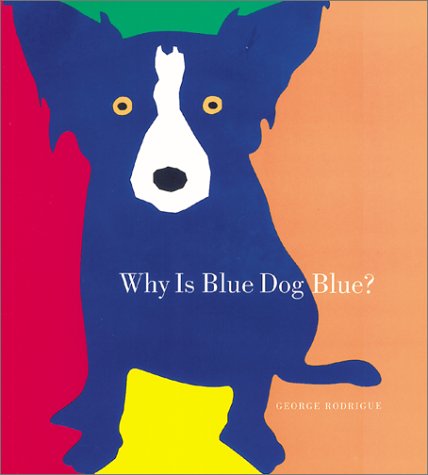
My third graders are starting a project based on George Rodrigue's Blue Dog paintings. I am always so excited to teach about a living artist, which made me extra sad to learn that Rodrigue died in December.
We are starting our lesson by reading Why Is Blue Dog Blue? by Rodrigue. I was nervous that the book is a little young for third graders, but they loved guessing what color Rodrigue would choose for each of the pages.
After reading the book, we drew the dogs together. I was using the SmartBoard and the kids followed along. I allowed them to add a collar to make each one unique. We will start painting next week!
I got the idea for this project from a former colleague. Her gallery is here. I love the color wheel, but realize that not all people do. I love that this project allows for students to mix their own secondary colors but isn't a boring, generic color wheel. I also love adding the iPad step at the end to add interest for students that might not have been excited about the painting step.
Here is the video I created using a free trial version of Camtasia. I love Camtasia. If I was in the market for a $300 software, it would be Camtasia. However, I'm not, so now I'm experimenting with iMovie-which is free-much more my price range!
I am doing this project with 4th graders, and they are looking great so far. A couple of classes are done or nearly done painting and will start Sharpie next class. My other school will be starting these next week.
Completed painting.
This and the following photos are after using the Percolator App.